
Generate badge
Build a download badge and the README text needed to display it.
Badge preview
Waiting for input.
Badge URL
Markdown
Keep track of release downloads and present them clearly.
GitHub shows how many times each release file has been downloaded, but it does not show how that total changed over time. GitHub Downloads Action keeps that history for you. Once added to a repository, it updates the numbers automatically and makes them easy to display in a README or project page.
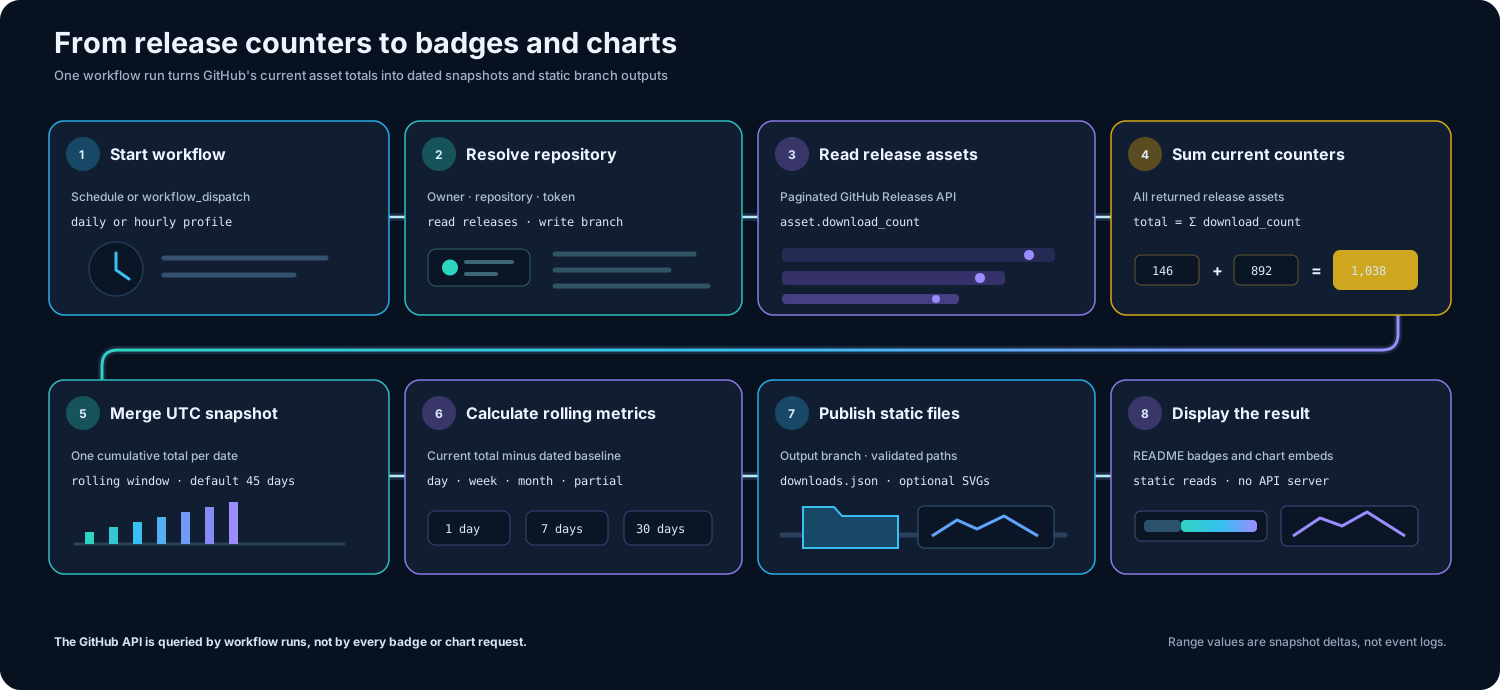
The action checks the download numbers shown by GitHub, adds them together, and saves the total for the current day. As that short history grows, it can show how much the number changed over the last day, week, or month.
Count downloads of files you attached to GitHub Releases. Repository copies, page views, and automatically created source archives are not included.
Save one total for each day. If there is not yet enough history for a full weekly or monthly comparison, the result is clearly marked as incomplete.
Publish a small data file and optional chart images that badges, READMEs, and project pages can use without running a separate server.
Choose how often the numbers should update and whether you want charts, then add the prepared setup file to your repository.
| Template | Best for | Schedule | Charts | Download |
|---|---|---|---|---|
gh-dl-daily.yml | Badges only | Daily | No | Download |
gh-dl-hourly.yml | More frequent updates | Hourly | No | Download |
gh-dl-daily-with-chart.yml | Badges and charts | Daily | Yes | Download |
If clicking Download opens the YAML in your browser, right-click the page and choose Save as,
then save it as a .yml file in .github/workflows/.
.github/workflows/ in your repository if it does not exist.Once the first download file has been created, enter the repository details below. Generator Lab previews the result and gives you the exact text to copy into a README.
Start in Basic for common setup. Use Advanced for branch, provider, cache, and action tuning.
Build a download badge and the README text needed to display it.
Waiting for input.
Generate chart embed markdown and action config snippets.
Waiting for input.
GitHub Downloads Action is open source. The history it creates stays in your repository, where it remains easy to inspect, reuse, or remove without depending on a hosted analytics account.
Type to filter, use ↑ and ↓ to move, then press Enter.
 TrackIndexOrganize and play local music libraries while keeping filenames and playlists in sync.
  MediaCrateSave video or audio from a link, choose the format and quality, and keep your downloads in an organized queue.
  OpenPianoDesktop piano you can play with your PC keyboard, mouse, or MIDI device.
  PianoscribeTurn piano recordings into editable MIDI for music and notation software, with processing kept on your computer. GitHub Downloads ActionKeep a history of GitHub release downloads and share the results as badges and charts.